
How Buyers Evaluate SOC 2 & Compliance Automation Software Before Booking a Demo
The demo isn’t the start of the buying process
If you’re researching SOC 2 automation software, you’re probably not “shopping for tools.” You’re trying to reduce risk.
The demo isn’t the start of the buying process in this category. It’s the checkpoint you reach after you’ve built enough confidence that the vendor won’t create more work, more uncertainty, or more exposure than the problem you’re trying to solve.
Before anyone books a call, there’s usually a quiet internal process happening. Stakeholders are asking different versions of the same question:
- Will this get us through the audit without chaos?
- Will it slow down engineering?
- Will it stand up to security scrutiny?
- Will we regret the choice six months from now?
This article breaks down the evaluation path buyers follow before a demo. It also explains what they look for on a vendor’s site and in their messaging to decide whether a conversation is worth their time.
Key Takeaways
- SOC 2 automation evaluations start before the demo, driven by internal risk and stakeholder alignment.
- Buyers filter vendors quickly based on clarity, trust signals, and implementation reality.
- The strongest decision drivers are timeline, workload, evidence quality, integrations, and audit readiness.
- Comparison and alternatives searches reveal what buyers need to justify internally.
- Most vendors get eliminated due to vague positioning, weak proof, and unclear time-to-value.
- A shared internal checklist helps teams evaluate tools consistently and avoid regret.
What triggers the search in the first place
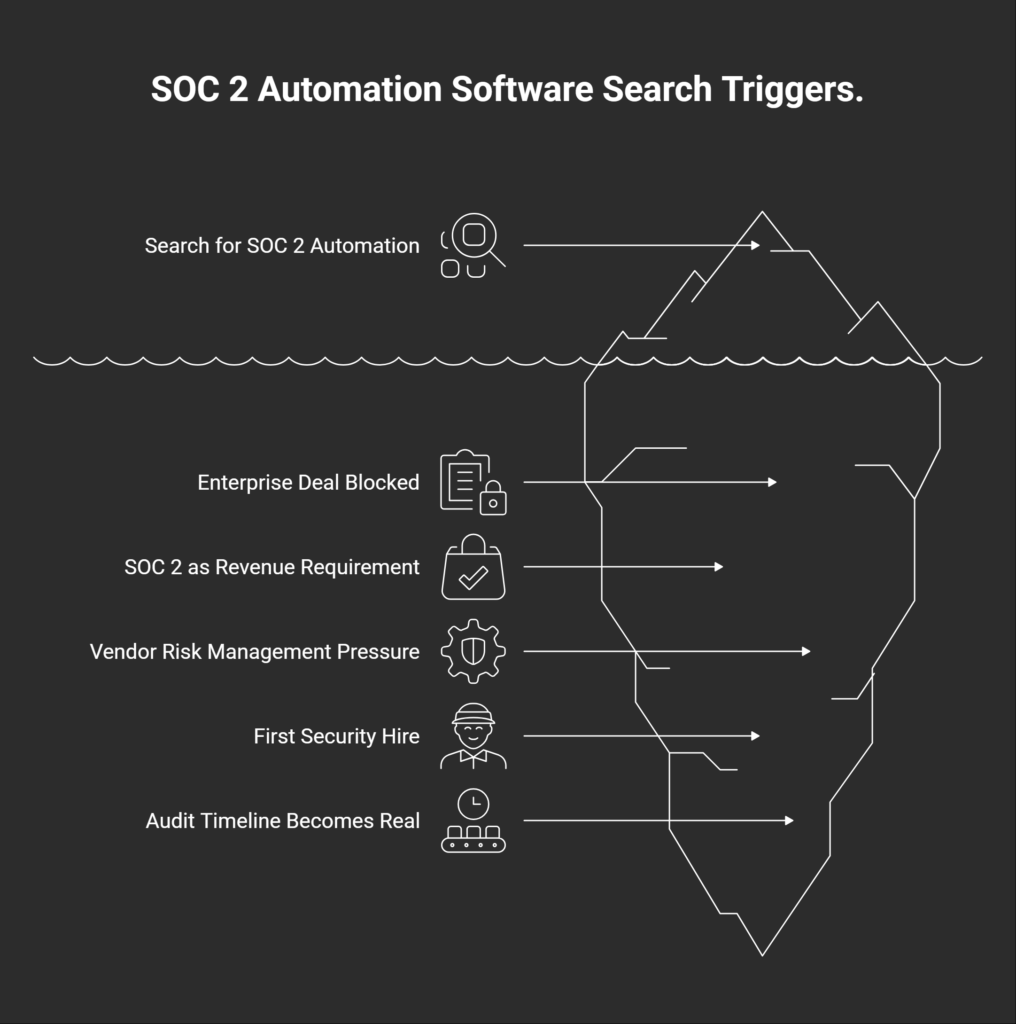
Most teams don’t wake up one day and decide to evaluate SOC 2 automation software out of curiosity. The search usually starts when something forces the issue. A deal gets stuck. A customer asks harder questions. Or leadership realizes compliance is no longer optional if the company wants to keep selling upstream.
Common “why now” triggers look like this:
- An enterprise deal gets blocked by security review
The buyer needs proof, not reassurance. The sales cycle pauses until there’s a plan. - A founder realizes SOC 2 is now a revenue requirement
Not a nice-to-have. A gate to larger contracts. - Renewal or vendor risk management pressure increases
Existing customers want tighter controls, faster answers, and less ambiguity. - The first security hire joins and pushes for process
They’ve seen the cost of ad hoc compliance before and don’t want to repeat it. - The audit timeline becomes real (“we need this in 60–90 days”)
Deadlines create urgency, and urgency creates tool evaluation.
The key point is simple: buyers aren’t buying “SOC 2 compliance”. They’re buying speed, certainty, and less chaos during a high-stakes process.
The buyer isn’t one person: who evaluates SOC 2 automation software?
Once the urgency hits, the next challenge is internal alignment. Most teams evaluating SOC 2 automation software aren’t making a simple tool purchase. They’re committing to a workflow that will touch engineering, security, operations, and sales at the same time.
That means the “buyer” is rarely one person. It’s a small group with different definitions of success.
| Stakeholder | What they care about most |
| Founder / CEO | Timeline, cost, sales impact, and whether this distracts the team |
| Head of Ops / COO | Implementation effort, process clarity, and keeping people accountable |
| Security lead / IT | Control mapping, evidence quality, integrations, and access control |
| Engineering | Time drain, ownership, and avoiding tool sprawl |
| Sales / RevOps | Deal acceleration, proof points, and trust assets that unblock buyers |
| Auditor (external influence) | Readiness, evidence consistency, and a smoother audit cycle |
This is why evaluation takes longer than people expect.
The real evaluation path before a demo
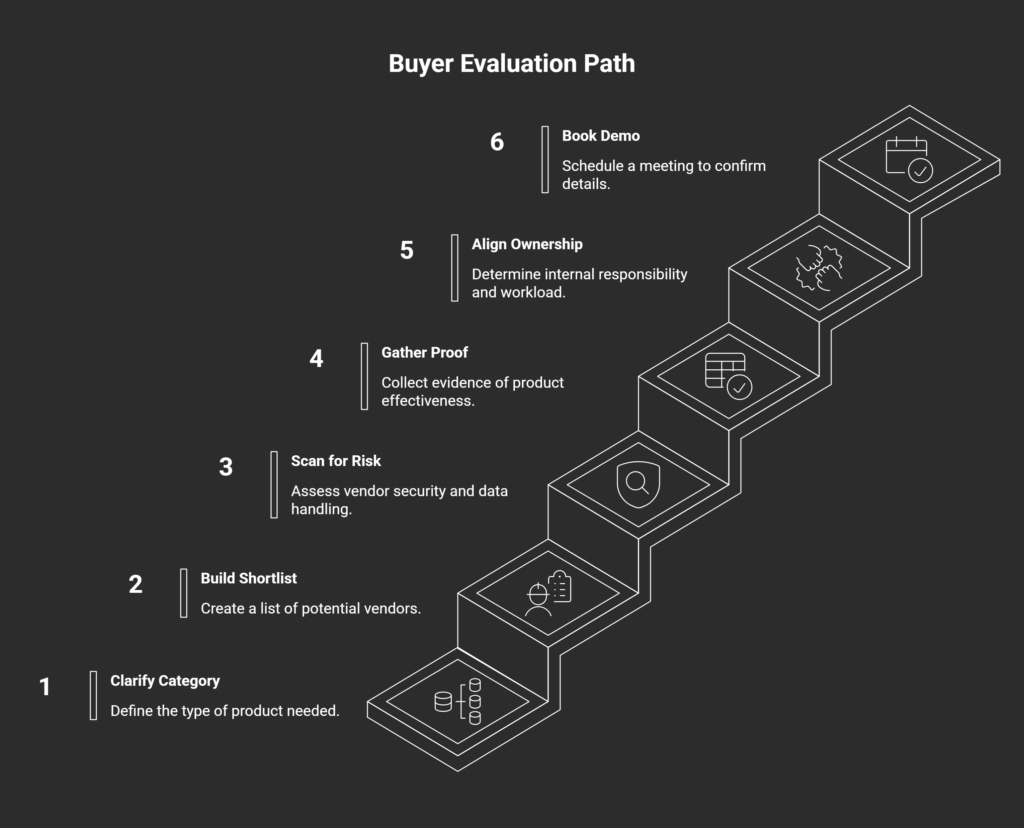
Once the urgency is clear and the stakeholders are involved, most teams follow a similar evaluation path. The order varies, but the checkpoints are consistent. Each step reduces uncertainty and helps the team decide whether a vendor is worth a conversation.
- Step 1: Clarify what category you’re buying
Teams often start by sorting vendors into rough buckets: SOC 2 platforms, compliance automation tools, lightweight GRC products, or checklist-style systems. The goal is simple. Buyers want to understand what the product actually replaces. Is it replacing spreadsheets and manual evidence collection? Is it replacing internal coordination? Or is it mainly a tracking layer on top of existing work? - Step 2: Build a shortlist quickly
Shortlists come from a mix of Google searches, peer recommendations, review sites, and LinkedIn posts. Most vendors are eliminated early. Buyers are scanning for fit, not perfection. If the positioning is unclear or the product seems misaligned with their stage, they move on. - Step 3: Scan for risk
This is the “will this create problems?” phase. Buyers look at vendor security posture, access controls, and how sensitive data is handled. In this category, the vendor becomes part of the trust chain. A weak security story creates friction internally, even if the product looks strong. - Step 4: Gather proof that it works in practice
Teams look for outcomes and constraints. Case studies matter, but only when they show specifics: time-to-certification, implementation effort, and what changed operationally. Buyers also look for signals that the product works for companies at their size and maturity level. - Step 5: Align internally on ownership and workload
Before booking a demo, someone has to answer two questions: who owns this internally, and what will implementation require? If ownership is unclear, the project stalls. - Step 6: Book the demo
The demo typically happens after the tool feels credible, safe, and realistically adoptable. At that point, the call is used to confirm details, not to start from zero.
What buyers look for on your website before they ever talk to you
By the time a team is close to booking a demo, your website is doing more work than your sales team. Buyers are using it to answer basic fit questions quickly and to surface risks they’ll have to defend internally.
Most visitors won’t read every page. They scan for a few signals that tell them whether your product matches their reality.
Buyers typically look for:
- Clear ICP definition: who this is built for (startup vs mid-market vs enterprise)
- Implementation reality: what setup actually involves and who owns it internally
- Integrations that reduce evidence work: the systems you connect to and what data you pull
- Security and trust signals: SOC 2 status, penetration testing, DPAs, access controls, documentation
- Outcomes that feel concrete: timelines, reduction in manual work, smoother audits
- Pricing signals: not always exact numbers, but enough to avoid surprises
- Product clarity: what the tool does day-to-day, not just what it “enables”
Underneath all of this is a simple trust checklist most buyers run subconsciously:
- Can I tell who this is for in under 10 seconds?
- Do I understand what work the tool removes?
- Does implementation look manageable for our team?
- Are the security answers easy to find and credible?
- Is there proof this works for companies like ours?
- Will I feel confident bringing this to internal stakeholders?
When those questions get answered cleanly, demo velocity goes up. When they don’t, buyers keep searching.
The 7 evaluation criteria buyers use
Once a shortlist exists, evaluation usually becomes more structured. Buyers may describe it as “seeing what features we need,” but the real filter is whether the tool reduces operational risk and makes the audit path predictable.
These are the seven criteria that tend to decide the outcome.
- Time-to-SOC 2 (readiness + audit timeline)
Teams care about speed, but not in the abstract. They want to know what changes operationally that make the timeline realistic. Does the platform reduce back-and-forth, clarify ownership, and prevent last-minute scrambling? Or does it mainly document work the team still has to do manually? - Implementation burden
Buyers look for how much work lands on engineering and ops during setup and ongoing maintenance. A tool that requires heavy customization, constant chasing, or complex onboarding creates internal resistance fast. - Evidence collection + control mapping quality
Buyers want confidence that evidence will hold up under audit scrutiny. Weak mapping creates downstream pain. Evidence that looks fine early can still get rejected late if it’s incomplete, inconsistent, or poorly tied to the control requirement. - Integrations + coverage
Integrations are evaluated as workload reduction, not as a checklist. Buyers want coverage, and gaps create manual work and slow down the process. - Workflow + accountability
SOC 2 work fails when tasks live in too many places, and no one owns the follow-through. A good workflow makes it obvious what’s done, what’s blocked, and what needs attention this week. - Vendor trust + security posture
In compliance automation, the vendor becomes part of the trust chain. Buyers look for security maturity that matches the claims: access controls, documentation, policies, and clear answers to common security questions. If the vendor introduces risk, internal approval gets harder. - Audit experience + auditor compatibility
Buyers want audits to feel smoother, not just better organized. They evaluate whether the tool supports consistent evidence, clean reporting, and an audit process that auditors can work with. If it only centralizes files without improving the audit workflow, the value is limited.
Common comparison searches buyers use
Once buyers understand the category and narrow down a shortlist, their searches get more specific. They stop looking for explanations and start looking for tradeoffs. Comparison and alternatives queries are usually a sign that internal alignment is already happening.
Here are common patterns you’ll see:
- “SOC 2 automation software vs spreadsheets”
- “Best SOC 2 automation tools”
- “[Vendor] vs [Vendor]”
- “[Vendor] alternatives”
- “SOC 2 compliance platform pricing”
- “How long does SOC 2 take with [tool]?”
These searches are rarely about curiosity. Each one maps to a practical internal question that someone needs answered before a demo.
| Search pattern | What the buyer is trying to decide |
| Tool vs spreadsheets | Is this worth switching for, or can we brute force it internally? |
| Best tools | What’s considered credible, and what gets eliminated early? |
| Vendor vs vendor | Which option fits our stage and constraints better? |
| Vendor alternatives | Are we missing a better fit, or a lower-risk option? |
| Pricing | Are we in the right budget range, or wasting time? |
| Timeline with a tool | Will this realistically reduce audit drag and uncertainty? |
If your site and content answer these questions cleanly, buyers move faster. If it doesn’t, they keep searching.
What makes buyers disqualify a tool before the demo
Most buyers don’t book demos with every vendor on their shortlist. They cut aggressively before they ever talk to sales. The goal is to avoid wasting internal time on tools that feel hard to justify, risky to implement, or unclear in value.
The fastest disqualifiers are usually visible within a few minutes of scanning a website.
Common reasons buyers drop a vendor early:
- Vague positioning
Phrases like “all-in-one compliance solution” don’t help buyers understand what you actually do or who you’re built for. - No clarity on implementation or time-to-value
If it’s unclear what onboarding requires, buyers assume the burden will land on them. - Feature soup with no workflow explanation
Long feature lists don’t answer the operational question: what changes week-to-week once the tool is in place? - Weak trust signals
Missing security pages, documentation, or proof creates friction with security and leadership reviews. - Case studies that feel cherry-picked or irrelevant
Buyers want examples that match their stage, team size, and audit pressure. - Pricing that feels intentionally hidden
Buyers can accept custom pricing. They don’t like surprises. - Everything sounds like marketing copy
Over-polished language reads as evasive in a category built on evidence and accountability.
A simple evaluation checklist buyers can use internally
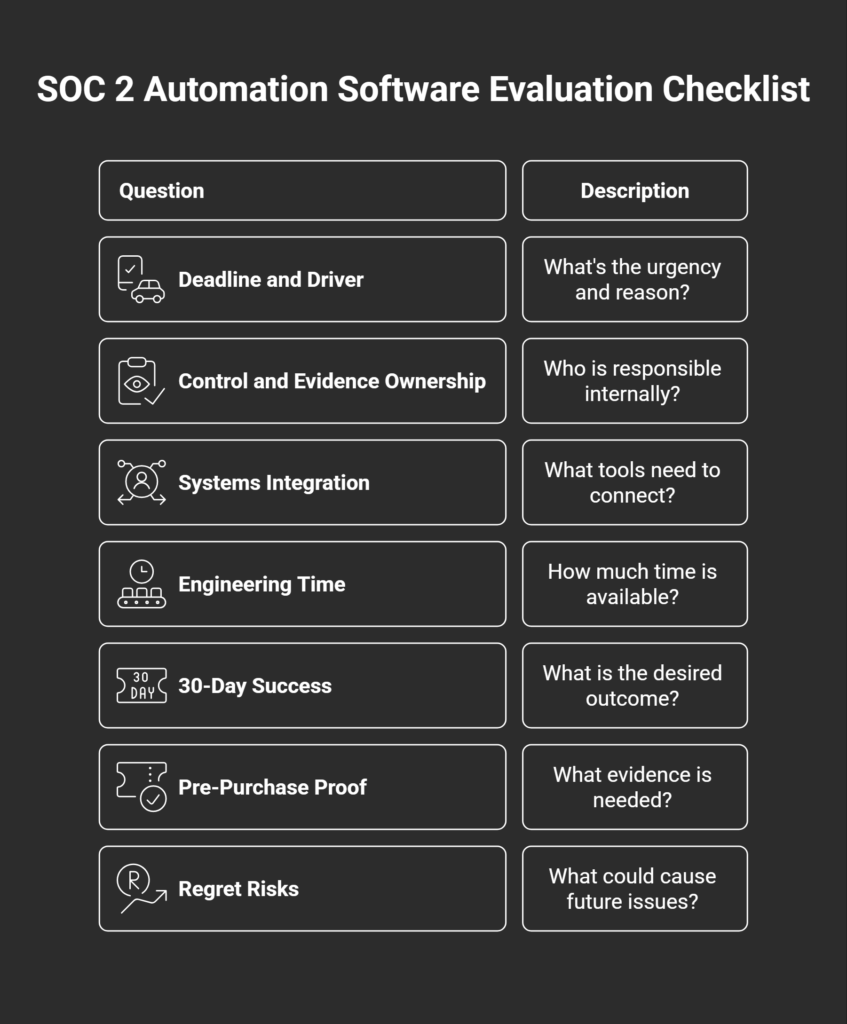
If you’re evaluating SOC 2 automation software across multiple stakeholders, the fastest way to reduce confusion is to align on a shared checklist. This keeps the decision grounded in constraints and prevents the process from turning into a debate over preferences.
Use the questions below as an internal working doc before demos. They’ll help you evaluate vendors consistently and surface gaps early.
Internal evaluation checklist
- What’s our deadline, and what’s driving it?
A customer requirement, a deal blocker, a renewal, or an audit timeline creates different levels of urgency. - Who owns the controls and evidence internally?
Clarify ownership across security, ops, and engineering before you assume the tool will “handle it.” - What systems need to integrate?
List the tools that matter for evidence collection and access review (cloud, identity, ticketing, HR, devices). - How much engineering time can we realistically spend?
Be honest. This usually determines whether implementation succeeds or stalls. - What does success look like after 30 days?
Define a concrete outcome: evidence flowing, tasks assigned, gaps visible, reporting usable. - What proof would make us confident before we buy?
Examples include implementation details, customer references, documentation, or audit-ready reporting. - What would make us switch later?
Name the regret risks upfront: gaps in integrations, weak workflows, unclear ownership, or audit friction.
Buyers want less risk over more info
Most SOC 2 automation evaluations look like feature research on the surface. In practice, they operate like risk reduction. Teams are trying to avoid surprises during implementation, avoid audit setbacks late in the process, and avoid internal ownership problems that turn compliance into a recurring fire drill.
The vendors that win tend to earn trust before the demo. They make it easy to understand who the product is for, what changes operationally after adoption, and what the path to audit readiness actually looks like. They also remove friction for internal stakeholders by providing clear security answers, credible proof, and realistic expectations.
If you’re marketing SOC 2 automation software, the job is to reduce uncertainty early. That means clarity in positioning, clarity in workflow, and clarity in outcomes.
Teams that understand this buying psychology tend to attract more qualified demos and waste less time on mismatched conversations.